HubSpot free CRM: what you get and where the limits are
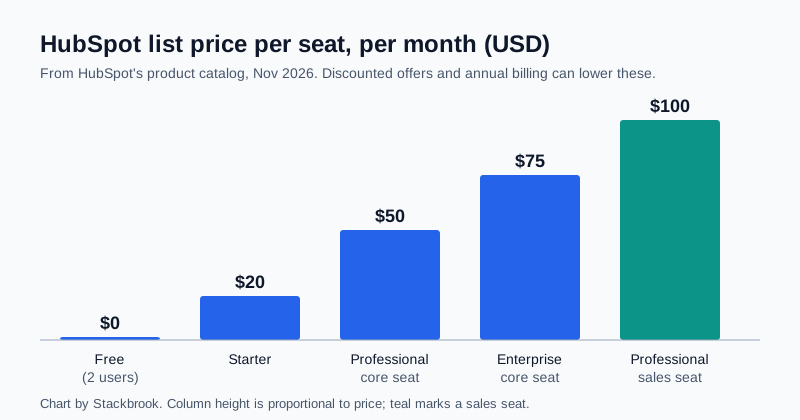
Chart created by Stackbrook from HubSpot's published catalog
HubSpot's free CRM is one of the most widely recommended starting points for a small team, but the free plan has hard edges. This guide lays out what HubSpot says is included, the limits that matter most, what the paid Starter plan changes, and what seat prices look like as a team grows. It is based on HubSpot's own published pages, not on our own use of the product, and HubSpot revises plans often, so confirm anything important on the live page.
What the free plan includes
HubSpot's CRM page says the free tier is permanent, with no expiry and no card required, for up to two users. It lists contact, deal and task management, email tracking and engagement notifications, email templates and scheduling, document sharing, meeting scheduling, live chat, sales quotes, reporting dashboards and an AI assistant called Breeze Assistant.
The limits that matter
Contacts. HubSpot's technical-limits page lists 1,000 contacts for free accounts, and the CRM page repeats the 1,000 figure. A reply in HubSpot's community forum explains the history: free accounts created before September 2024 were allowed far more, and newer free accounts are capped at 1,000 total. A forum reply is not official policy, so treat it as context and HubSpot's own pages as the rule.
Users. Two. HubSpot's Starter page says the free plan has 2 users, while Starter allows unlimited users with seats bought per user. A user who hits the cap can be blocked from adding a second person even when the contact count is lower, according to a community thread in which deactivated users still counted toward the limit. That is one user's report, not a documented rule.
Custom properties. HubSpot's Starter comparison lists 10 custom properties on Free against 1,000 on Starter. If you track many fields per contact, such as industry, source, contract date and renewal month, ten goes quickly.
Automation. The same page lists one automated action per email and one automated email per form on Free. Sequences, which send timed follow-up emails, are not part of Free or Starter in the sources we found; HubSpot's sales-tool pages place them in Professional.
Branding and support. Free carries HubSpot branding on emails, forms, live chat and meeting links, with community and knowledge-base support only. Starter removes the branding and adds email and in-app chat support.
Email volume. Sending one-to-one email from a connected inbox is subject to a daily limit, which HubSpot's knowledge base gives as 500 emails a day on a hosted inbox for a free account, against 5,000 on a paid account. For bulk marketing email, HubSpot's own pages disagree on the free allowance: its seats-and-credits supplement lists 300 sends per calendar month, while a HubSpot blog guide says 2,000. Check which applies to your account before you plan a newsletter.
API calls. The technical-limits page lists 100 API requests per 10 seconds for Free and Starter. This matters only if you connect other tools through HubSpot's API.
What Starter changes
HubSpot's catalog lists a Starter core seat at $20 per month. HubSpot's Starter page has also shown limited-time offers for new customers, at $7 per seat per month with annual payment or $10 month to month, so the price you see may be lower. HubSpot's separate seats-and-credits supplement describes a different seat structure, with Starter seats from €20, so confirm the figure shown at sign-up. Starter includes 500 HubSpot Credits a month, which are used by some AI and automation features.
HubSpot's Starter page warns that a Starter bill can also rise if you add seats, buy add-ons or exceed an included limit such as a marketing contact tier. HubSpot's pages also say the number of marketing emails you can send depends on the marketing contacts you buy, and its supplement notes that some sends and automation actions use HubSpot Credits.
What seats cost as you grow
The catalog lists core seats at $20 (Starter), $50 (Professional) and $75 (Enterprise) per month, and sales seats with full Sales Hub features at $100 (Professional) and $150 (Enterprise). The chart above shows most of them. For a three-person team that needs only a CRM and basic tracking, the jump from Free is a modest Starter bill; the larger steps start when you need sequences or custom reporting.
Who the free plan fits
- A founder or a pair: under 1,000 contacts and simple pipelines will fit without paying.
- A small team that imports a mailing list: the 1,000-contact cap and two-user cap will probably force an upgrade or a different tool. The comparison of free CRMs on this site covers the alternatives.
- Anyone who needs sequences or heavy automation: budget for Professional rather than expecting Free or Starter to cover it.
Before you import data, count your contacts and users against these caps, and export a backup so you can move later if the limits stop working for you.
Sources
- HubSpot free CRM (HubSpot)
- HubSpot Starter plan compared with Free (HubSpot)
- HubSpot Products and Services Catalog (seat prices)
- HubSpot Products and Services Catalog, technical limits
- Sending limits for connected email accounts (HubSpot Knowledge Base)
- Flexible seats-and-credits catalog supplement (HubSpot)
- HubSpot free plan over the limit (HubSpot Community)
- HubSpot Marketing Hub pricing guide (HubSpot blog)
- Free HubSpot features, contact limit thread (HubSpot Community)