Zapier alternatives and what each one charges
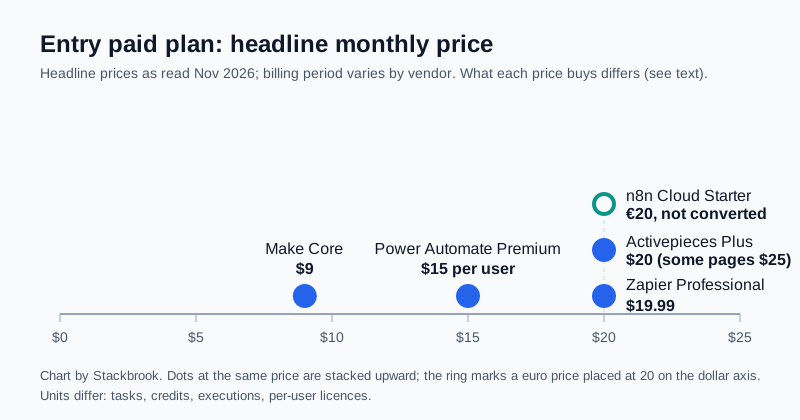
Chart created by Stackbrook from the vendors' published pricing
Zapier is the best-known automation tool, but it is not the only way to connect apps without code. The alternatives bill in different units, which makes a simple price comparison misleading. This guide lists what Make, n8n, Activepieces and Microsoft Power Automate say they charge, what each price counts, and who each one suits. It relies on the vendors' published pages and not on our own use of the tools. Vendors change plans often, so check the live page before you buy.
The short version
| Tool | Headline entry paid price | What it counts | Free option |
|---|---|---|---|
| Zapier | Professional, from $19.99 a month billed annually | Tasks (750 in Zapier's blog; confirm the tier on the live page) | Free plan, 100 tasks a month |
| Make | Core, about $9 a month (billing period not stated on Make's comparison page) | Credits (10,000 on that plan) | Free plan, 1,000 credits a month |
| n8n | Cloud Starter, €20 a month billed annually | Workflow executions (2,500) | Self-hosted Community Edition |
| Activepieces | Plus, $20 a month on one page, $25 on others | Credits or tasks, depending on the page | Free plan, plus self-hosted Community Edition |
| Power Automate | Premium, $15 per user a month billed yearly | Per user licence; cloud flows and attended desktop flows included | Free trial |
The chart shows only the headline price. A $9 plan and a $20 plan are not comparable until you know how many steps your workflow uses, which is why the next sections explain each unit.
Zapier, the baseline
Zapier's Free plan allows 100 tasks a month and, per its pricing page, limits Zaps to two steps. Zapier's blog lists the Professional plan at $19.99 a month on annual billing with 750 tasks, while the live pricing page says "starting from" and offers several task tiers. Zapier counts a task as an action your Zap successfully completes, so a Zap with several actions uses several tasks every time it runs; filters and similar built-in steps do not count. Our earlier guide, "Zapier vs Make pricing", works through the arithmetic.
Make
Make's pricing page lists a free plan with 1,000 credits a month, and its comparison page lists a Core plan with 10,000 credits for $9 a month without stating the billing period. Make has also changed its plans over time, so confirm the current amount and billing period. A credit is consumed when a module runs, so a long scenario costs more per run than a short one.
n8n
n8n's pricing page lists Starter at €20 a month billed annually for 2,500 workflow executions, and Pro at €50 a month. It says every plan includes unlimited users, unlimited workflows and every integration, and that pricing depends on monthly workflow executions "regardless of complexity", meaning a workflow with many steps counts as one execution.
The other option is self-hosting. n8n's documentation describes a free Community Edition with almost the complete feature set. The cost then is the server and your time: you pay for the server, backups and updates yourself. Activepieces puts a small server for its own self-hosted edition at $4.50 to $24 a month, which gives a rough idea of hosting cost, though n8n publishes no figure.
Activepieces
Activepieces describes itself as open source with a self-hosted Community Edition. Its published material is not consistent about plans. One of its blog posts says the Free plan has 1,000 tasks a month and Plus costs $25 a month, while a later post says Free has 1,000 credits and Plus is $20 for 10,000 credits, with extra credits at $0.007 each. Both are on Activepieces' own site, so the newer wording and the live pricing page are the ones to trust. Some features such as single sign-on sit on higher plans.
Microsoft Power Automate
Power Automate is priced differently. Microsoft's page lists Premium at $15 per user a month, paid yearly, including cloud flows and attended desktop flows, and Microsoft's licensing material describes licences per user, per bot or per flow. Microsoft notes that final prices are shown at checkout. Unattended automation is priced higher, at $150 per bot a month. It suits teams already inside Microsoft 365, and it is less natural for connecting a broad set of non-Microsoft apps.
How to choose
- Low volume, simple two-app jobs: compare the free plans of Zapier, Make and Activepieces first.
- Many steps per run: n8n counts one execution per run regardless of steps, and Power Automate Premium is priced per user, whereas Zapier tasks and Make credits grow with the actions or modules in a run.
- You have someone technical: self-hosting n8n or Activepieces removes the per-run bill, in exchange for upkeep.
- Your team lives in Microsoft 365: price Power Automate per user against the other options.
Before you switch, list one real workflow, count its steps and monthly runs, and price it on each tool's own unit. Then recheck the live pricing page, because several vendors changed their wording during 2025 and 2026.
Sources
- n8n plans and pricing (n8n)
- Choose how to use n8n (n8n docs)
- n8n vs Zapier (n8n)
- Activepieces, is Activepieces free (Activepieces)
- We flipped the script on automation pricing (Activepieces)
- Power Automate pricing (Microsoft)
- Power Platform licensing FAQs (Microsoft Learn)
- Make vs Zapier comparison (Make)
- Zapier pricing (Zapier)
- Make pricing and subscription packages (Make)
- Zapier pricing overview (Zapier blog)